Category: Uncategorized

  • MEIJIA Portable All-Weather Waterproof Hard Case: A Practical Guide to Protective Gear Storage

    MEIJIA Portable All-Weather Waterproof Hard Case: A Practical Guide to Protective Gear Storage

    Introduction

    Cameras, drones, lenses, memory cards, batteries, and other electronic equipment are often more vulnerable to environmental conditions than their users realize. A piece of photography equipment may be perfectly functional in a studio or office but face very different conditions when taken outdoors. Rain, dust, sand, accidental impacts, moisture, and rough transportation can all create challenges for people who regularly carry sensitive gear.

    A protective hard case provides one way to address these concerns. Rather than placing equipment directly into a backpack or soft camera bag, a hard case creates a dedicated protective enclosure around the contents.

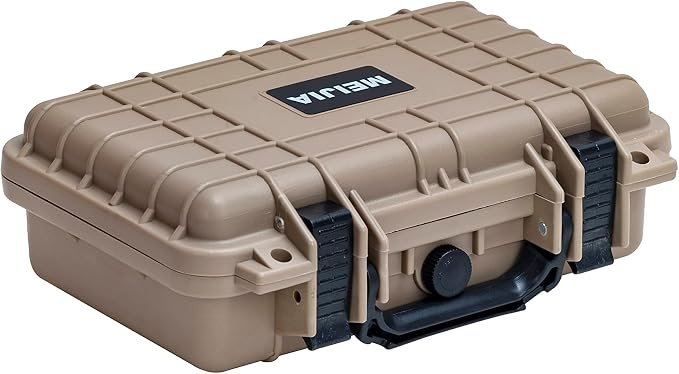
    The MEIJIA Portable All Weather Waterproof Protective Hard Case is a small protective case designed for equipment such as cameras, drones, and related gear. The listed dimensions are approximately 11.65 × 8.35 × 3.78 inches, and the case uses customizable foam so users can create an interior arrangement around the equipment they intend to carry.

    The combination of a rigid exterior and customizable foam is particularly relevant for people who need to transport equipment that can be affected by impacts or movement. Instead of relying on a single open compartment, the foam can be arranged to create dedicated spaces around individual items.

    This type of case can be useful for photographers, drone operators, travelers, outdoor enthusiasts, content creators, and hobbyists. However, choosing a protective case involves more than looking at the word “waterproof.” Users should also consider interior dimensions, equipment size, foam layout, portability, environmental conditions, and how the case will be transported.

    This guide examines the MEIJIA hard case from an informational perspective. It explains the purpose of a protective equipment case, how customizable foam works, potential applications, important considerations, and how hard cases compare with other storage options.

    What Is a Protective Hard Case?

    A protective hard case is a rigid container designed to provide a more structured form of protection than a standard bag or pouch.

    The exterior shell creates a barrier between the equipment and the surrounding environment, while the interior can provide cushioning or separation.

    For photography and drone equipment, this can be particularly useful because many components are relatively delicate.

    Examples include:

    • Cameras
    • Compact drones
    • Lenses
    • Controllers
    • Batteries
    • Memory cards
    • Cables
    • Small electronic accessories
    • Other sensitive equipment

    A hard case does not eliminate every possible risk, but it can provide a dedicated protective environment that is different from simply placing equipment loose inside a backpack.

    Key Features of the MEIJIA Hard Case

    Portable Hard-Shell Construction

    The case uses a rigid protective format rather than a soft fabric exterior.

    A hard shell can help resist certain forms of external pressure and accidental contact during transportation.

    This can be useful when a case is placed inside a larger bag, stored in a vehicle, or carried through an outdoor environment.

    However, hard-shell construction should not be interpreted as making the contents indestructible. Equipment can still be damaged by severe impacts, incorrect packing, or insufficient cushioning.

    The case works as one layer of protection within a broader equipment-transport system.

    Waterproof and All-Weather Orientation

    The product is described as an all-weather waterproof protective case.

    Water resistance is particularly important for outdoor equipment because weather conditions can change quickly.

    A camera or drone carried in an exposed environment may encounter:

    • Rain
    • Wet ground
    • Splashes
    • Humidity
    • Damp storage areas
    • Dust mixed with moisture

    A protective enclosure can help separate the equipment from these environmental conditions.

    Users should still pay close attention to the manufacturer’s specifications regarding the exact level of water protection. Waterproof terminology can refer to different levels of protection depending on the product’s construction and intended use.

    Customizable Foam Interior

    One of the most practical features of the case is its customizable foam.

    Foam can be arranged or removed to create spaces that correspond to the shape of the equipment being stored.

    This is useful because camera and drone equipment does not have a universal shape.

    A photographer may need room for a compact camera body and accessories, while another user may need space for a small drone, controller, batteries, and cables.

    Customizable foam allows the user to adapt the interior rather than relying entirely on fixed compartments.

    Compact Dimensions

    The listed external dimensions are approximately 11.65 inches long, 8.35 inches wide, and 3.78 inches high.

    These dimensions place the case in a relatively compact category compared with large equipment trunks and professional transport cases.

    A compact case can be useful when portability is important.

    However, external dimensions should not be confused with usable internal space. The shell, foam, and interior construction take up some of the total volume.

    Before packing expensive equipment, users should compare the actual interior dimensions with the dimensions of their equipment.

    Why Customizable Foam Matters

    A fixed interior may work well for one specific type of equipment but become less useful when the user changes gear.

    Customizable foam addresses this issue by allowing the user to create a more personalized layout.

    Creating Individual Equipment Spaces

    For example, a user may create one larger compartment for a camera body and several smaller areas for:

    • Batteries
    • Memory cards
    • Cables
    • Chargers
    • Small accessories

    Another user could configure the foam around a compact drone and its controller.

    The goal is to prevent equipment from moving freely inside the case.

    Reducing Internal Movement

    When equipment moves around inside a case, components can potentially collide with one another.

    A properly arranged foam interior helps keep individual items separated.

    This is especially relevant when transporting cameras and other equipment with protruding controls, lenses, or delicate components.

    Adapting the Case Over Time

    One advantage of customizable foam is that the layout can potentially be changed when equipment changes.

    For example, someone might initially configure the case for a compact camera and later rearrange the interior to accommodate different accessories.

    The usefulness of this feature depends on the amount and type of foam supplied and how it is intended to be configured.

    How It Can Be Used for Camera Equipment

    Photographers often transport equipment between home, studio, outdoor locations, and events.

    A hard case can serve as a dedicated storage container for smaller camera setups.

    Possible contents may include:

    • Compact camera bodies
    • Small lenses
    • Batteries
    • Memory cards
    • Charging accessories
    • USB cables
    • Small cleaning tools

    The exact combination depends on the dimensions of the equipment.

    A larger professional camera body or long telephoto lens may require a larger case.

    The compact format of this case is therefore more appropriate for equipment combinations that fit comfortably within its interior dimensions.

    How It Can Be Used for Drones

    Small drones can include several components that benefit from organized storage.

    A typical portable drone setup may include:

    • Drone body
    • Remote controller
    • Batteries
    • Propellers
    • Charging cable
    • Small accessories

    The customizable foam can potentially be arranged to create separate areas for these components.

    However, users should verify the dimensions of their particular drone before choosing the case.

    Different drone models can vary substantially in size, and a case suitable for a compact drone may not accommodate a larger aircraft or extensive accessory kit.

    Protecting Camera Accessories

    Protective cases do not have to be used only for the primary device.

    Small accessories can also benefit from structured storage.

    For example, memory cards are physically small and easy to misplace. Batteries may also need to remain separated from loose metal objects such as keys or other conductive materials.

    Keeping accessories organized within a dedicated equipment case can make packing more systematic.

    However, batteries should always be transported and stored according to the battery manufacturer’s safety recommendations.

    Outdoor Photography Applications

    Outdoor photography can expose equipment to unpredictable conditions.

    A photographer may move between a vehicle, trail, beach, park, or other outdoor environment.

    A protective case can provide a controlled storage environment between shooting sessions.

    For example, when rain begins, the camera can be returned to the case rather than being left exposed in an open camera bag.

    The case can also be useful when moving through dusty or sandy environments.

    The exact level of environmental protection depends on the case’s construction and proper use.

    Travel Applications

    Travel creates several equipment-management challenges.

    Camera gear may be transported through airports, vehicles, hotels, hiking trails, and other environments.

    A rigid case can help keep smaller equipment contained rather than allowing it to move freely inside luggage.

    The compact size of the MEIJIA case can make it relevant to travelers who want a dedicated protective container without carrying a large equipment trunk.

    For air travel, users should also consider airline requirements, baggage policies, battery transportation rules, and whether sensitive equipment should remain in carry-on luggage.

    Use for Content Creators

    Content creators frequently carry compact technology equipment.

    A creator might have a camera, small microphone accessories, batteries, memory cards, adapters, and other equipment.

    A customizable case can serve as a small production kit.

    This can be particularly convenient when moving between filming locations.

    Instead of collecting individual pieces from different storage areas, the creator can maintain a dedicated case for the equipment used regularly.

    Who May Find This Case Suitable?

    Photographers

    Photographers carrying compact camera equipment may appreciate a dedicated hard case with customizable interior storage.

    Drone Operators

    Users of smaller drones may use the case to organize the drone and associated accessories.

    Content Creators

    Creators who travel with small production equipment can use the case as a portable gear container.

    Outdoor Enthusiasts

    People who regularly take electronic equipment into outdoor environments may value additional protection against environmental conditions.

    Travelers

    Travelers carrying sensitive equipment can use a hard case as one layer of protection inside their luggage system.

    Hobbyists

    Hobbyists with specialized electronic equipment may appreciate having a dedicated container rather than storing everything loose in a drawer or backpack.

    Important Things to Consider

    Check Interior Dimensions

    One of the most important considerations is compatibility.

    The listed external dimensions are approximately 11.65 × 8.35 × 3.78 inches, but the equipment must fit within the actual usable interior.

    Before purchasing or configuring the case, measure:

    • Device length
    • Device width
    • Device height
    • Controller dimensions
    • Battery dimensions
    • Cable and accessory space

    Remember that foam compartments also consume some of the available interior volume.

    Do Not Overcrowd the Case

    It can be tempting to use every available section of a customizable foam interior.

    However, overpacking can reduce the protective benefits.

    Equipment should have enough surrounding material to remain appropriately supported.

    The objective is not simply to maximize the number of items stored. It is to create a stable arrangement.

    Consider Equipment Shape

    Two devices with similar dimensions can still require different foam layouts.

    Camera bodies often have protruding grips, viewfinders, lenses, or controls.

    Drone controllers can have sticks, screens, antennas, or other protruding components.

    The foam should be configured around the actual shape rather than just the maximum width and length.

    Waterproof Does Not Mean Unlimited Exposure

    Even if a case is described as waterproof, users should not assume it can withstand every possible water-related situation.

    The effectiveness of water protection depends on proper closure, seals, and the conditions specified by the manufacturer.

    Users should follow the product’s instructions regarding water exposure and maintenance.

    Check the Case Before Important Trips

    For critical equipment, it is sensible to inspect the case before travel.

    Check that:

    • The case closes properly.
    • The seal is clean.
    • The foam remains correctly positioned.
    • Equipment does not move excessively.
    • Accessories are securely stored.

    This can reduce avoidable problems during transportation.

    Hard Case Versus Soft Camera Bag

    Soft camera bags are popular because they are lightweight and often include multiple compartments.

    They can be convenient for photographers who need quick access to equipment.

    A hard case provides a different type of storage.

    Hard Case Advantages

    A rigid case can offer:

    • Structured protection
    • A defined storage environment
    • Greater resistance to external pressure
    • Protection from environmental exposure, depending on design
    • Customizable foam organization

    Soft Bag Advantages

    A soft bag can offer:

    • Easy access
    • Lower weight
    • Flexible storage
    • Comfortable carrying options
    • More convenient everyday photography access

    A photographer who frequently changes lenses while walking may prefer a soft camera bag for accessibility.

    Someone transporting equipment through harsher environments may place greater importance on a protective hard case.

    The two categories can also be used together.

    Hard Case Versus Backpack

    A backpack is generally better suited to carrying equipment over longer distances.

    It distributes weight across the body and can contain multiple categories of gear.

    A hard case, by contrast, provides a more controlled protective environment.

    One practical approach is to place a smaller protective case inside a larger backpack.

    This creates two layers:

    1. The backpack provides overall carrying convenience.
    2. The hard case provides dedicated protection for sensitive equipment.

    Whether this combination makes sense depends on the equipment and the user’s travel style.

    Hard Case Versus Padded Pouch

    A padded pouch provides basic cushioning while remaining flexible and lightweight.

    It can be suitable for a small camera or accessory that is already being carried inside a backpack.

    A hard case provides a more rigid barrier.

    The choice depends on the level of environmental and impact protection required.

    Someone traveling locally with minimal gear may prefer a pouch, while someone working in a dusty or wet outdoor environment may consider a more protective enclosure.

    Building a Protective Gear Kit

    A protective case becomes more useful when paired with a sensible packing system.

    For example, a small photography kit could include:

    • Camera
    • One compact lens
    • Spare battery
    • Memory cards
    • Charging cable
    • Small cleaning cloth

    A compact drone kit might include:

    • Drone
    • Controller
    • Batteries
    • Charging cable
    • Spare small accessories

    The exact configuration should be based on the equipment rather than attempting to fill the case completely.

    Organizing Customizable Foam

    Customizable foam works best when the user takes time to plan the layout.

    Start With the Largest Item

    Place the largest piece of equipment in the intended position first.

    This provides a reference point for the rest of the layout.

    Add Smaller Items Around It

    Once the primary device has a suitable compartment, smaller accessories can be arranged around it.

    This can help maximize available space without forcing components together.

    Leave Protective Boundaries

    Avoid creating compartments so close together that equipment touches other equipment directly.

    The purpose of the foam is to provide separation as well as organization.

    Test the Closure

    After arranging the equipment, close the case carefully.

    The lid should not press unnecessarily against the contents.

    If the equipment feels compressed, the interior arrangement may need to be adjusted.

    Maintaining a Protective Case

    A hard case is itself equipment that needs occasional care.

    Keep the Seal Clean

    If the case uses a sealing system, dirt or debris around the seal can potentially interfere with proper closure.

    Inspecting the sealing area periodically is therefore useful.

    Keep the Interior Clean

    Dust and sand can accumulate inside outdoor equipment cases.

    A clean interior reduces the chance of particles contacting sensitive equipment.

    Inspect the Foam

    Over time, repeated removal and repositioning of foam can change the shape of the compartments.

    Users should occasionally check whether the equipment remains securely supported.

    Frequently Asked Questions

    What is the MEIJIA Portable All Weather Hard Case?

    It is a compact protective hard case designed for equipment such as cameras, drones, and related accessories. It features customizable foam for arranging the interior around the equipment being carried.

    What are the listed dimensions?

    The product is listed at approximately 11.65 × 8.35 × 3.78 inches.

    Can the case be used for drones?

    Yes. The product is designed to accommodate certain drone equipment, although users should verify the dimensions of their particular drone and accessories before use.

    Can it hold a camera?

    It can be used for compatible camera equipment. The specific camera, lens, and accessory combination needs to fit within the available interior space.

    What is customizable foam?

    Customizable foam allows the user to create spaces within the case that correspond to the shape and size of individual equipment pieces.

    Why is foam useful in a protective case?

    Foam can help cushion equipment and reduce movement inside the case when properly configured.

    Is the case waterproof?

    The product is described as an all-weather waterproof protective case. Users should follow the manufacturer’s specifications regarding the conditions and duration of water exposure.

    Can it protect equipment from dust?

    A properly closed protective case can help isolate equipment from environmental dust, depending on the case’s sealing design and the conditions involved.

    Is it suitable for travel?

    Its compact format can make it useful for transporting compatible photography, drone, and electronic equipment during travel.

    Can the case be placed inside a backpack?

    A compact hard case can potentially be carried inside a larger backpack if the backpack has sufficient space.

    Can it replace a camera backpack?

    Not necessarily. A hard case and a camera backpack serve different purposes. A backpack is generally designed for carrying comfort and broader storage, while a hard case emphasizes dedicated protection.

    Can large camera lenses fit inside?

    That depends on the specific lens dimensions. Users should compare the lens size with the usable interior dimensions before configuring the foam.

    Does waterproof construction make the case submersible?

    Not necessarily. Waterproof terminology does not automatically mean that a product can be submerged indefinitely. Users should follow the manufacturer’s stated water-resistance specifications.

    How should the foam be configured?

    The foam should be arranged so that equipment is supported and separated without being excessively compressed.

    Can the foam layout be changed later?

    The customizable design is intended to allow the interior arrangement to be adapted. Users should follow the manufacturer’s guidance when changing the foam configuration.

    Is the case suitable for batteries?

    Compatible batteries may be stored with equipment, but lithium-ion and other rechargeable batteries should always be transported and stored according to their manufacturer’s safety instructions and applicable travel regulations.

    Conclusion

    The MEIJIA Portable All Weather Waterproof Protective Hard Case is designed to provide a dedicated protective environment for compact photography, drone, and electronic equipment. Its approximately 11.65 × 8.35 × 3.78-inch format places it in a portable category, while the customizable foam allows users to adapt the interior to the equipment they intend to carry.

    For photographers, drone operators, content creators, travelers, and outdoor enthusiasts, the combination of a rigid exterior and customizable interior can provide a practical alternative to storing sensitive equipment loose inside a backpack or soft pouch.

    The case can be particularly useful when environmental conditions are a concern. Rain, dust, sand, and general outdoor handling can create challenges for electronics, and a properly closed protective enclosure can provide an additional layer of separation between equipment and its surroundings.

    At the same time, users should evaluate the case based on their actual equipment. The external dimensions alone do not determine compatibility. Cameras, lenses, drones, controllers, batteries, and accessories come in many different shapes and sizes, so measuring the equipment and planning the foam layout are important steps.

    Compared with a soft camera bag, a hard case generally emphasizes structured protection over quick access. Compared with a backpack, it provides a more dedicated environment for sensitive equipment. Compared with a simple padded pouch, it can offer a more substantial protective structure.

    The most effective use of a case like this is therefore not simply filling it with as much equipment as possible. A carefully planned interior arrangement, appropriate spacing, proper closure, and regular inspection can make the protective system more useful.

    For anyone looking for a compact way to organize and protect compatible camera, drone, or electronic equipment during travel and outdoor activities, a customizable hard case is a practical category worth considering.
    You can check more details on Amazon here.

  • UGREEN Electronics Organizer Travel Case: A Practical Guide to Organizing Cables and Tech Accessories

    UGREEN Electronics Organizer Travel Case: A Practical Guide to Organizing Cables and Tech Accessories

    Introduction

    Modern travel often involves carrying more small electronic accessories than expected. A phone may need a charging cable, a laptop may require a power adapter, wireless earbuds may need their charging case, and other devices can introduce USB adapters, memory cards, data cables, and accessories. When these items are placed loose inside a backpack or suitcase, finding the right cable or adapter can become surprisingly inconvenient.

    An electronics organizer case provides a simple way to bring some structure to this collection of small accessories. Instead of placing cables, memory cards, chargers, and adapters together in a single pocket, an organizer can give each category a more defined place.

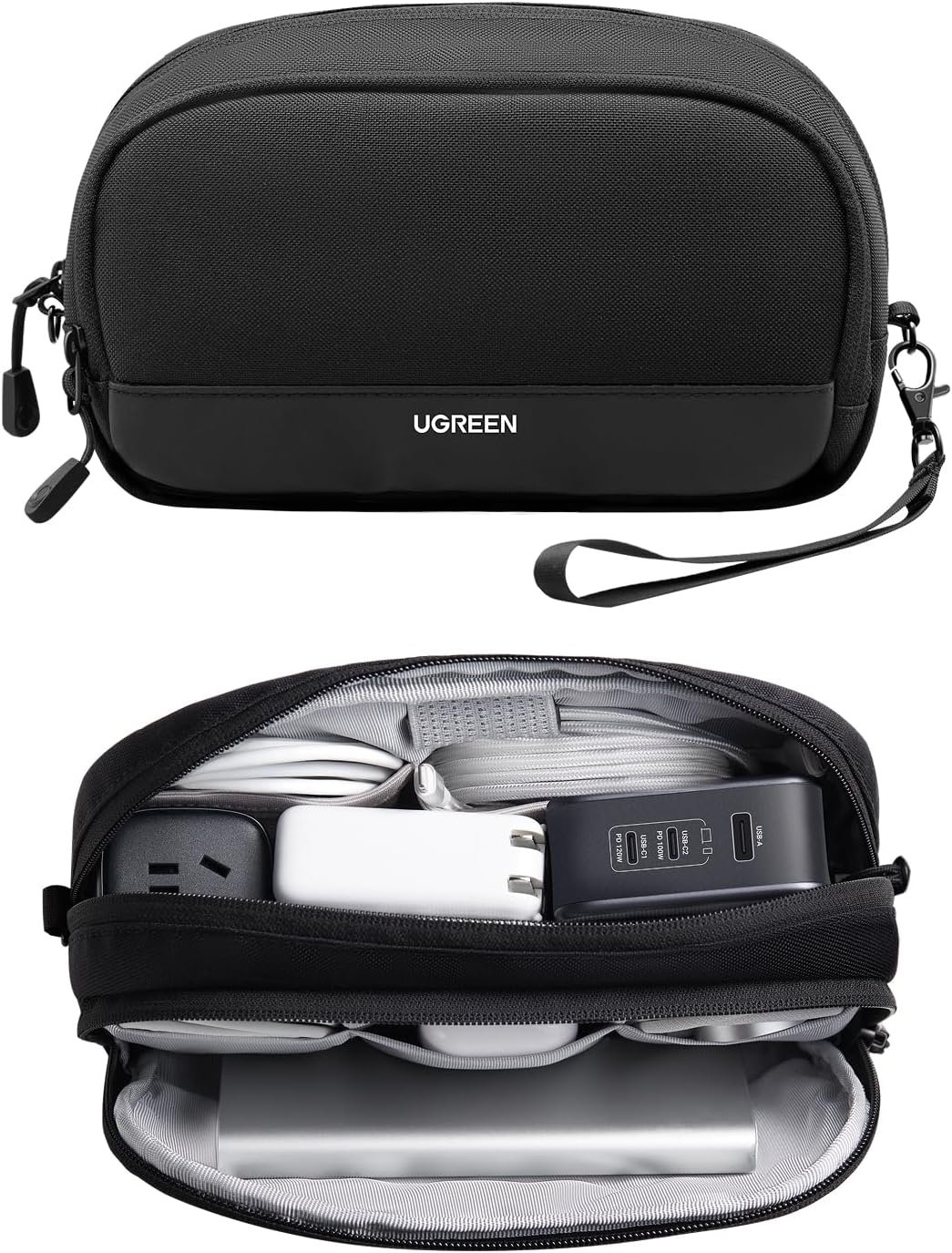
    The UGREEN Electronics Organizer Travel Case is a medium-sized carrying case designed for electronic accessories such as cables, cords, SD cards, earbuds, chargers, USB adapters, and related items. Its purpose is not to replace a backpack or laptop bag, but to create a dedicated organizational layer inside one.

    This distinction is useful. An electronics organizer is primarily about organization, portability, and access. It can help reduce loose accessories moving around inside a larger bag while making it easier to identify what is being carried.

    The UGREEN case can be relevant to travelers, remote workers, students, photographers, commuters, and anyone who regularly carries multiple electronic accessories. At the same time, an organizer is not equally useful for every person. Someone who only carries a phone and one charging cable may have little need for a dedicated case, while someone carrying several devices may benefit much more from a structured storage solution.

    This guide examines the UGREEN Electronics Organizer Travel Case from an informational perspective. It covers the main characteristics of this type of organizer, practical ways to use it, what to consider before choosing one, and how an electronics organizer compares with simpler storage options.

    What Is an Electronics Organizer Travel Case?

    An electronics organizer travel case is a compact storage solution designed specifically for small technology accessories.

    Unlike a standard pouch, which may provide one open compartment, an electronics organizer generally divides the interior into multiple sections. Depending on the particular design, these areas may accommodate cables, memory cards, small adapters, chargers, earbuds, and other accessories.

    The idea is simple: instead of storing everything together, the user can organize accessories according to size, type, or frequency of use.

    This can be particularly helpful when traveling.

    A loose collection of charging cables and adapters can quickly become difficult to manage inside a backpack. Cables may become tangled, small memory cards can be difficult to locate, and adapters can disappear underneath larger objects.

    A dedicated organizer provides a separate place for these items.

    Key Features of the UGREEN Electronics Organizer

    Dedicated Storage for Electronic Accessories

    The primary purpose of the UGREEN organizer is to hold small technology accessories.

    The listed product is designed for items including:

    • Charging cables
    • Data cables
    • Cords
    • SD cards
    • Earbuds
    • Chargers
    • USB adapters
    • Small electronic accessories

    This range makes the case suitable for people who carry several different types of technology accessories rather than only one or two items.

    The exact amount that can be stored will depend on the size and shape of the accessories.

    Medium-Size Format

    The product is described as a medium-sized organizer.

    A medium format can provide a practical balance between storage capacity and portability.

    A very small organizer may be convenient to carry but can become restrictive when several chargers and cables need to be stored. On the other hand, a large electronics case can become bulky, particularly when the user only needs to carry a modest collection of accessories.

    The medium category is therefore relevant for users who want more structure than a small pouch without necessarily carrying a large equipment case.

    Multiple Accessory Categories

    An electronics organizer is most useful when its interior layout matches the types of items the user carries.

    Cables can take up space differently from memory cards or earbuds. A good organization system allows different accessories to remain separated instead of becoming one tangled collection.

    For example, a traveler might dedicate one area to charging cables, another to USB adapters, and another to removable storage.

    This kind of organization can make the case easier to use even when the user is carrying many small accessories.

    Travel-Oriented Design

    The product is specifically positioned as a travel case.

    Travel introduces several challenges for small electronics accessories.

    Items are frequently moved between backpacks, carry-on luggage, hotel rooms, offices, and other locations. Without a consistent storage place, small accessories can easily be left behind.

    A dedicated organizer creates one location where these accessories can be stored during transport.

    That can make packing and unpacking more systematic.

    Why Cable Organization Matters

    Cables are among the easiest technology accessories to accumulate.

    A person may have separate cables for:

    • A smartphone
    • A tablet
    • A laptop
    • Wireless earbuds
    • A portable battery
    • A camera
    • Other USB-powered devices

    Even when the cables look similar, they may serve different purposes.

    Some may support charging only, while others may support data transfer. Some may have different connectors or lengths.

    When several cables are stored together without organization, identifying the correct one can take time.

    A dedicated electronics organizer can provide separate spaces for cables, making it easier to retrieve a particular accessory without emptying an entire bag.

    How It Can Be Used for Travel

    Travel is one of the most obvious applications for an electronics organizer.

    Carry-On Organization

    A traveler can place commonly needed technology accessories in the organizer and keep it inside a carry-on bag.

    Instead of searching through several pockets for a charging cable or adapter, the user has one dedicated case to open.

    This can be particularly useful during airport travel, train journeys, or long-distance trips where access to chargers and cables may be necessary.

    Hotel and Accommodation Use

    Once at a hotel or other accommodation, the organizer can remain as a central location for electronic accessories.

    Rather than scattering cables across a bedside table, desk, or luggage compartment, users can return them to the case when they are finished.

    This creates a consistent routine that can reduce the possibility of accidentally leaving an accessory behind.

    Packing and Unpacking

    The case can also simplify packing.

    Instead of collecting individual cables and accessories one by one, the organizer can be packed as a single unit.

    When the trip ends, the same case can be placed back into the larger bag.

    Use for Remote Work

    Remote workers often carry a collection of accessories between home, office, cafés, coworking spaces, and temporary work locations.

    A typical setup might include:

    • Laptop charging accessories
    • USB cables
    • USB adapters
    • Memory cards
    • Earbuds
    • Portable storage
    • Phone charging accessories

    Keeping these items in one organizer can make a mobile workstation easier to manage.

    The case can function as a small technology kit that moves with the user.

    This can be particularly helpful for people who do not have a permanent desk setup.

    Use for Students

    Students increasingly carry technology between classrooms, libraries, study spaces, and home.

    A student may use a laptop or tablet alongside charging cables, USB accessories, headphones, and storage devices.

    A dedicated electronics organizer can help keep these smaller accessories together.

    Instead of placing loose cables inside a backpack’s main compartment, students can use the organizer as a separate technology-accessory section.

    The result is not necessarily more equipment; it is simply a more structured way to carry what they already have.

    Use for Photographers and Content Creators

    Photography and content creation can involve many small accessories.

    Depending on the equipment, a creator may carry:

    • Memory cards
    • USB card readers
    • Charging cables
    • Camera cables
    • Small adapters
    • Earbuds
    • Portable storage accessories

    An electronics organizer can provide a place for these smaller items without taking up the space required for larger camera equipment.

    However, memory cards deserve particular attention. They contain valuable data and should be handled and stored carefully.

    An organizer can help keep them in one place, but it should not be treated as a substitute for proper data backup practices.

    Use for Commuters

    People who commute regularly may carry technology accessories every day.

    A commuter might move between home, an office, and other locations while carrying a laptop, smartphone, earbuds, and charging equipment.

    A dedicated organizer can remain inside the work bag, providing a consistent place for the accessories.

    This can be especially useful for commuters who regularly switch between different bags.

    Organizing the Case Efficiently

    Simply owning an electronics organizer does not automatically create an organized system.

    The way items are arranged matters.

    Group Similar Items Together

    One approach is to group accessories by type.

    For example:

    • Charging cables in one area
    • USB adapters in another
    • Memory cards in a protected section
    • Earbuds in another compartment
    • Small miscellaneous accessories in a remaining space

    This makes the case easier to understand at a glance.

    Separate Frequently Used Items

    Accessories used every day should be easy to reach.

    There is little benefit in placing the most frequently used charging cable at the bottom of a tightly packed section.

    A practical organization system should reflect how the user actually uses the accessories.

    Avoid Overpacking

    An organizer works best when it has enough room for the accessories it is intended to carry.

    Overfilling a case can make it difficult to close, increase pressure on cables and connectors, and make individual items harder to retrieve.

    Instead of treating every available space as storage capacity, users can leave some room for easy access.

    Who May Find This Organizer Useful?

    Frequent Travelers

    People who regularly travel with several electronic devices may find a dedicated accessory case useful.

    It can create a consistent storage location for cables, adapters, and small technology items.

    Remote Workers

    Workers who move between locations can use the organizer as part of a portable workstation.

    Students

    Students carrying laptops, tablets, chargers, and USB accessories may benefit from keeping smaller items together.

    Photographers

    Photographers and content creators often have small accessories that need to remain together without occupying the space required by larger equipment.

    Tech Enthusiasts

    People who own several gadgets often accumulate cables and adapters.

    An organizer can provide a practical way to keep these accessories separated.

    Everyday Commuters

    Someone who carries a laptop and several accessories every day may appreciate the convenience of having one dedicated technology pouch.

    Important Things to Consider

    Not Every Accessory Will Fit

    An organizer designed for cables and small accessories should not automatically be considered suitable for every piece of technology equipment.

    Large power adapters, bulky chargers, external drives, or oversized accessories may take up substantial space.

    Before packing, users should consider the dimensions of their particular accessories.

    Cable Length Matters

    Long cables can take up more space than short charging cables.

    If a user carries many long cords, the organizer may fill more quickly than expected.

    Rolling or loosely arranging cables can help make use of the available space without placing unnecessary stress on connectors.

    Different Chargers Have Different Sizes

    USB charging accessories vary considerably.

    A compact phone charger may fit easily while a larger laptop power brick may require more room.

    Users should consider their specific charging equipment rather than assuming all chargers will fit equally well.

    Memory Cards Need Care

    SD cards and similar storage media are small and easy to misplace.

    Keeping them in a dedicated area can make them easier to find, but users should still handle them carefully.

    More importantly, physical storage does not protect against data loss. Important files should always have appropriate backups.

    Organization Adds Another Item to Your Bag

    Although an organizer can reduce loose clutter, it is still another physical object to carry.

    Someone who only carries a single charging cable and wall adapter may find a small pouch or existing bag pocket more practical.

    The value of an electronics organizer generally increases with the number and variety of accessories being carried.

    Consider Your Daily Carry

    A useful question is not simply “How much can the case hold?”

    A better question is “What do I actually carry?”

    A medium-sized organizer may be appropriate for someone carrying multiple accessories, but unnecessary for a minimalist setup.

    Comparing Electronics Organizers With Simple Pouches

    A simple pouch provides basic storage.

    It may be inexpensive, flexible, and easy to carry.

    However, an open pouch does not necessarily separate accessories.

    Several cables, adapters, and small items may end up in the same compartment.

    An electronics organizer introduces more structure.

    This can make individual items easier to locate, although it may also take up more space than a flexible pouch.

    The choice depends on whether the user values organization or maximum simplicity.

    Comparing Electronics Organizers With Hard Cases

    Hard-shell electronics cases offer a more rigid form of protection.

    They can be useful when the contents are sensitive to crushing or when equipment needs additional structural protection.

    However, hard cases can be bulkier and may use more space in a backpack.

    A softer organizer can be more flexible for everyday travel and can adapt better to different accessory shapes.

    Neither approach is universally appropriate.

    A user carrying delicate equipment may prioritize physical protection, while someone primarily concerned with cable organization may prioritize flexibility and accessibility.

    Comparing Electronics Organizers With Backpack Compartments

    Many modern backpacks include dedicated technology pockets.

    These can be convenient because they eliminate the need for a separate organizer.

    However, backpack compartments may not provide enough separation for people carrying many small accessories.

    A dedicated case allows the user to remove the entire accessory collection from the backpack.

    This can be particularly convenient when changing bags.

    For example, a traveler can move the organizer from a work backpack to a weekend bag without individually transferring every cable.

    Why a Dedicated Organizer Can Help With Bag Changes

    People who regularly switch bags can benefit from modular organization.

    Without an organizer, changing bags may involve checking several pockets to make sure no cable, adapter, or memory card has been forgotten.

    With a dedicated electronics case, the technology accessories remain together.

    The user can simply transfer the case.

    This does not guarantee that nothing will ever be forgotten, but it can simplify the process.

    Keeping a Technology Kit Ready

    Some people prefer to maintain a dedicated travel technology kit.

    The idea is to keep commonly needed accessories in the organizer so that the case is ready when travel begins.

    A typical kit might include:

    • One or more charging cables
    • A compact charger
    • USB adapters
    • Earbuds
    • Memory cards
    • A card reader
    • Other small accessories

    The exact contents should be based on actual needs.

    Keeping unnecessary accessories in the case can make it heavier and more cluttered without providing much benefit.

    Managing Cable Tangling

    One of the practical benefits of a structured organizer is reducing the chance of cables becoming mixed together.

    Cable tangling is often caused by several loose cords being stored together without separation.

    Users can improve organization by:

    1. Keeping cables loosely coiled.
    2. Grouping similar cables.
    3. Avoiding unnecessary bends.
    4. Separating frequently used cables.
    5. Keeping small adapters in their designated areas.

    The goal is not simply to make the case look organized. It is to make each accessory easier to retrieve.

    Practical Use at Home

    An electronics organizer does not have to be used only for travel.

    It can also function as a small home storage solution.

    For example, someone may use it to keep spare USB cables, adapters, SD cards, and earbuds together in a desk drawer.

    This can be useful for households where several small electronic accessories accumulate over time.

    A dedicated location can make it easier to determine what accessories are available before purchasing another one.

    Practical Use in the Office

    In an office environment, a technology organizer can be useful for employees who regularly connect different devices.

    A worker may carry adapters for external displays, USB devices, charging cables, or portable storage.

    Keeping these items together can simplify movement between meeting rooms and workstations.

    For shared workspaces, a compact organizer can also help keep personal accessories separate from communal equipment.

    Frequently Asked Questions

    What is the UGREEN Electronics Organizer Travel Case?

    It is a medium-sized carrying case designed to organize small electronic accessories such as cables, cords, SD cards, earbuds, chargers, USB adapters, and related items.

    What can be stored in an electronics organizer?

    Common contents include charging cables, data cables, USB adapters, memory cards, earbuds, small chargers, and other compact electronic accessories.

    Is this type of organizer useful for travel?

    Yes. A dedicated electronics organizer can help keep travel accessories together inside a backpack, carry-on bag, or suitcase.

    Can it be used for laptop accessories?

    It can be used for smaller laptop-related accessories such as cables, adapters, and compact accessories. Large laptop power supplies may require more space than smaller accessories.

    Can SD cards be stored in it?

    The product is designed to accommodate SD cards and other small electronic accessories. Memory cards should still be handled carefully and backed up appropriately when they contain important data.

    Is it suitable for charging cables?

    Yes. Charging and data cables are among the primary types of accessories an electronics organizer is designed to hold.

    Can earbuds be stored in the case?

    The product description identifies earbuds among the intended accessories. Users should consider the size of their particular earbuds case when organizing the interior.

    Is a dedicated electronics organizer better than a normal pouch?

    Not automatically. A pouch may be simpler and more flexible, while an organizer provides more structure. The right option depends on how many accessories the user carries.

    Does a medium-sized organizer hold every type of charger?

    No. Chargers and power adapters vary significantly in size. Larger power bricks may require more space than smaller USB chargers.

    Can it be used at home?

    Yes. An electronics organizer can also be used as a storage solution for cables, adapters, and other accessories at home.

    Is it useful for students?

    It can be useful for students carrying laptops, tablets, charging cables, USB accessories, and other small technology items between home and school.

    Can photographers use an electronics organizer?

    Photographers may use this type of case for smaller accessories such as memory cards, card readers, cables, and adapters. Larger camera equipment requires dedicated storage.

    Does organizing cables prevent them from becoming damaged?

    Proper storage can help reduce unnecessary tangling and bending, but it does not guarantee that cables will never become damaged. Cables should still be handled appropriately.

    Should an electronics organizer be completely full?

    Not necessarily. Overpacking can make items harder to retrieve and can place unnecessary pressure on the case and its contents. Leaving some space can make the organizer easier to use.

    Can the organizer be moved between different bags?

    Yes. One practical advantage of a dedicated electronics case is that it can serve as a portable accessory kit that moves between backpacks, work bags, and luggage.

    Conclusion

    The UGREEN Electronics Organizer Travel Case is designed to address a common problem in modern travel and everyday technology use: the accumulation of small electronic accessories.

    Cables, cords, SD cards, earbuds, chargers, USB adapters, and other compact accessories are easy to carry but can become difficult to organize when they are scattered throughout a backpack or drawer. A dedicated organizer provides a central location for these items and can make them easier to find when needed.

    The medium-sized format is relevant for users who carry more accessories than can comfortably fit in a simple pocket or pouch but do not necessarily need a large equipment case. Travelers, remote workers, students, photographers, commuters, and technology enthusiasts can all have practical reasons for using this type of storage solution.

    At the same time, an electronics organizer is not automatically necessary for everyone. Someone who carries only one cable and a small charger may find a standard bag pocket sufficient. The value becomes more apparent as the number and variety of accessories increase.

    Compared with a simple pouch, an organizer offers greater structure. Compared with a hard case, it can provide a more flexible approach to everyday accessory storage. Compared with relying entirely on backpack compartments, it creates a portable technology kit that can be transferred between bags.

    The most effective approach is to organize the case according to actual usage. Frequently needed cables should remain accessible, similar accessories can be grouped together, and the case should not be overloaded simply because additional space is available.

    For people looking for a practical way to manage cables, chargers, memory cards, earbuds, adapters, and other small technology accessories, an electronics organizer can be a useful part of a larger travel or everyday carry system.

    You can check more details on Amazon here.